Showing posts with label General. Show all posts
Showing posts with label General. Show all posts
Wednesday, July 21, 2010
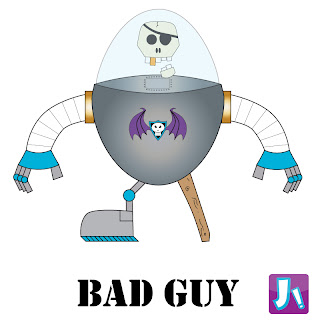
Bad Guy design
This is the final design of my enemy for Little Jay. I decided on using similar colours as I did with my other designs, to add connections and continuity through the brand. As I also couldn't think of a name which I liked I decided to settle on Bad Guy, as this sums up the character, but allows me the opportunity to change/reveal a new name at a later date. J!

Tuesday, July 13, 2010
Alive
I just wanted to put out a post stating that I am still breathing and active, just had a real busy month, went away for one week but then had to go all around the UK, and spent a lot of time in hospitals (everything's fine now, I hope). Anyway that means that the time off I was going to take for planing projects has shifted to now so I won't be very active for the next month or so, but then you should check back for hopefully some cool new stuff.
Thanks J!
Thanks J!
Friday, June 18, 2010
Time out
Just wanted to write this quick post incase anyone is following this blog and wonders why the input has significantly dropped of late. Well, believe it or not the more time off I have like now, the harder I find it to achieve things, weird I know, think it has to do with self doubt and over thinking. Anyway, I do have some ideas, but I am more of a pen and paper guy for the early stages of production, so you may not see anything appearing for the next couple of months, but then hopefully, bam, a new design with lots of cool things should rapidly start to appear, so don't give up, give me time.
Also I am creating a new thread to my blog entitled 'Cool Stuff' as I am a self confessed geek, and I constantly see things I think are cool, but my wife has given up listening and caring so I am sharing it here instead.
Thanks for your support, J!
Also I am creating a new thread to my blog entitled 'Cool Stuff' as I am a self confessed geek, and I constantly see things I think are cool, but my wife has given up listening and caring so I am sharing it here instead.
Thanks for your support, J!
Friday, June 4, 2010
Animated avatar
After browsing Twitter for new people to follow, I noticed some people had avatars which were animated. I was confused at first as Twitter only allows you to upload one pic as your profile picture, so how could you have an animation?
After searching around the internet I discovered that by using Photoshop you could save a series of images as a .gif or .png file, and use that as a single picture file.
To create an animated avatar simply open Photoshop and have a single layer for each complete frame of the animation, select each layer (using the shift key to select multiple frames), then with all frames selected go up to the 'window' tab on the main bar and select 'animation' from the drop down menu. A single frame (layer 1) should appear on the left side of the box which has just appeared. In the top right of the animation window box, click to open the drop down menu, and select the option 'make frames from layers', now each frame should appear individually across that box (like the original image which appeared when you first opened the animation window). The final step is to change the timings for each frame from the drop down box under each frame. Once complete you test with the play controls on the bottom left of the animation window, then when you are happy with the results, save for web like a normal gif, BUT make sure that the 'looping options' are set to 'forever' before you click the final save button.
You now have an animated .gif file which you can use, however Twitter have since stopped you from uploading animated gifs to their site, only originals now exist. As this was the reason for me to create mine I know have to figure out what I intend to do with it now, as I feel it is too good to just sit here, even if I do say so myself. J!
(Please note that the animation doesn't work on this site, this post is a copy from my main blog hosted on my main site)

After searching around the internet I discovered that by using Photoshop you could save a series of images as a .gif or .png file, and use that as a single picture file.
To create an animated avatar simply open Photoshop and have a single layer for each complete frame of the animation, select each layer (using the shift key to select multiple frames), then with all frames selected go up to the 'window' tab on the main bar and select 'animation' from the drop down menu. A single frame (layer 1) should appear on the left side of the box which has just appeared. In the top right of the animation window box, click to open the drop down menu, and select the option 'make frames from layers', now each frame should appear individually across that box (like the original image which appeared when you first opened the animation window). The final step is to change the timings for each frame from the drop down box under each frame. Once complete you test with the play controls on the bottom left of the animation window, then when you are happy with the results, save for web like a normal gif, BUT make sure that the 'looping options' are set to 'forever' before you click the final save button.
You now have an animated .gif file which you can use, however Twitter have since stopped you from uploading animated gifs to their site, only originals now exist. As this was the reason for me to create mine I know have to figure out what I intend to do with it now, as I feel it is too good to just sit here, even if I do say so myself. J!
(Please note that the animation doesn't work on this site, this post is a copy from my main blog hosted on my main site)

Monday, March 8, 2010
Vids and Pics
Just wanted to point out that I now have my own YouTube channel and Flickr channel where people can view my work, but more importantly to get myself out there and link back to my website.
These links will obviously be two way once I have finished the redesign of my website, and both channels need to be filled out more which takes time.
These links will obviously be two way once I have finished the redesign of my website, and both channels need to be filled out more which takes time.
Wednesday, February 3, 2010
D.I.S.C.O.
After playing about with Photoshop and Illustrator I created this simple 70's inspired disco girl image.

New online signature
Just wanted to play about with my online signature, I always sign off texts or e-mails to friends and family with just J!, a capital J and an exclamation mark, I also like the colour scheme on my website, as mentioned before, red, whites and blacks. Combining these elements with simple shapes, like the triangles which already exist on my website, I have created these basic ideas to follow up on, and create a mark which instantly makes me recognisable.

Monday, January 18, 2010
First experience with 3D
Working with "3D studio max" I produced this simple cannon animation by following a tutorial. I loved the outcome and wish I could afford the cost and time to really understand the programme as I would love to work with this tool in my professional life.
Standardising my on-line presence
I wasn't sure what to do with this strand in my blog. When I started, I was going to use it as more of a diary about myself (see my first ever blog post), but I then decided I wasn't that comfortable with putting myself out there so much, and left it as a dead end. However, now my confidence and skill level are growing I have decided to use this strand as a diary of my progress and showcase my own development. To go with this I intend to redesign my own website and combine it with my other web sources to create a unified online presence. The first step I have taken towards this goal is to simply match the colour scheme of my website, red, grey, and black with whites, on this blog.
Thursday, October 1, 2009
Blog Virgin
This is my first ever post!
So just checking that it works and I haven't just broke the internet or caused a blackhole.
Fingers crossed.
J!
So just checking that it works and I haven't just broke the internet or caused a blackhole.
Fingers crossed.
J!
Subscribe to:
Posts (Atom)